Customise calendar event titles
How do I change the titles of events SyncHire creates?
In Settings, Meeting defaults card, the title-template field
takes free text plus three variables, typed or inserted with the
Insert chips:
%{candidate}— the candidate;%{interviewer}— who the candidate is meeting, resolved for
each appointment: the hiring manager, any guests, and you when you
attend (the "Me" chip, or a booking on your personal link). Several
people are named together ("Daniel Whitfield & Sophie Marchand");%{duration}— the length.
Example: Interview %{candidate} × %{interviewer} (%{duration}).
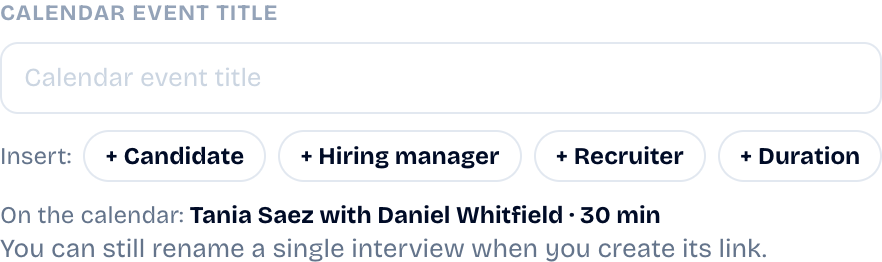
%{interviewer} replaces %{hiring_manager} and %{recruiter},
which named a FIXED role: one template serves both your
candidate↔hiring-manager interviews and your own screening calls, and
%{recruiter} put your name on interviews you don't attend. Both old
variables keep working in templates you already saved — they are
simply no longer offered.
An empty variable erases itself cleanly (no orphan "Tania with") and
an unknown variable is refused when you save.
Can I set titles more precisely?
Yes, from general to specific — each level only applies when filled:
- Settings — the default template for all your links.
- The reusable link — its Link settings… panel carries its
own template (useful to tell screenings and interviews apart). - The interview — in the composer, the title card fixes one
named interview's exact title, as long as it isn't booked yet.
Did this article help?